SDO AUTOPLAY IS BACKSUBSCRIBE FROM RM40/MO RENEW 6 MONTHS, GET +1 MONTH FREE ALIPAY ACCEPTED FOR MAINLAND CHINA 2-YEAR EARLY-BIRD RM385 SDO AUTOPLAY IS BACKSUBSCRIBE FROM RM40/MO RENEW 6 MONTHS, GET +1 MONTH FREE ALIPAY ACCEPTED FOR MAINLAND CHINA 2-YEAR EARLY-BIRD RM385
H
HYBRIDCHEATS
SDO Autoplay · est. 2016
Home Features

// 01 · What you actually get

Everything it does.
Nothing it doesn't.

HybridCheats is one small Windows client with three tabs. You sign in and press Confirm — the panel answers "Injected successfully!" and from there the engine plays for you, perfectly, for as long as you leave it running. Ten years of development went into making that the entire user manual.

01
SETUP
FROM LOGIN TO INJECTED

Two screens stand between opening the client and playing: a sign-in box and the Main tab. That is the whole setup.

Your licence is checked against our server on every launch, so there is no key file to keep safe and nothing to paste. Sign in with the same account you use for the member panel — the status line under the button reports what the client is doing, and it will not go any further until the licence clears.

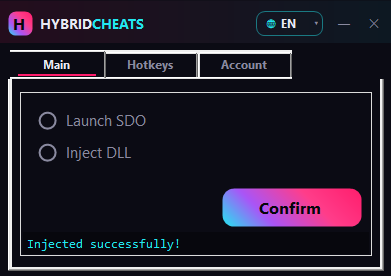
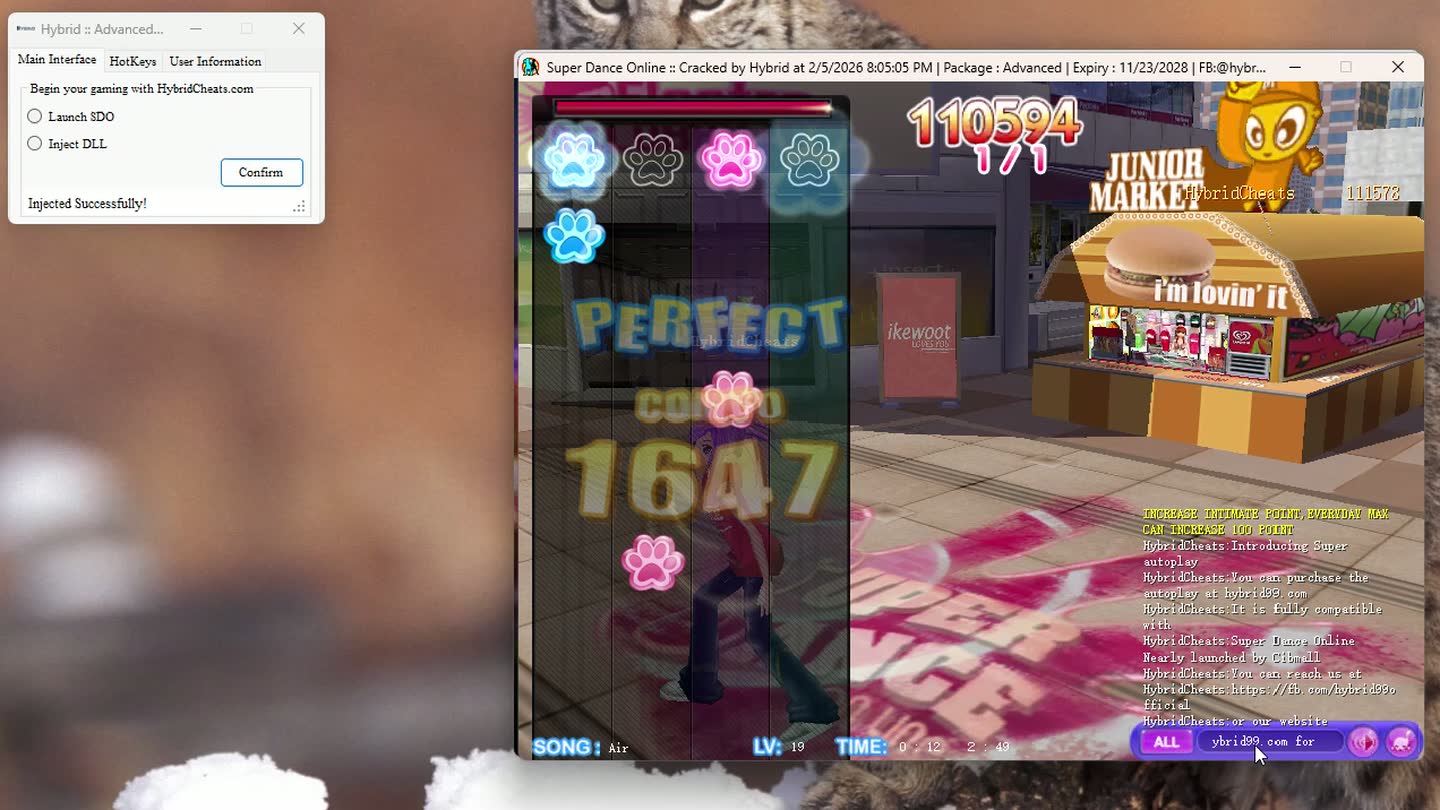
On the Main tab you tick Inject DLL and press Confirm. The status line turns green: "Injected successfully!" Nothing else is asked of you. There is no profile to build, no config file to edit, no per-song preparation.

Screens before play
TWO
Settings to tune
NONE
Client language
EN / CN
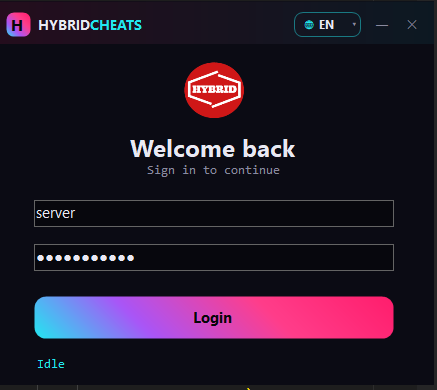
HybridCheats sign-in screen with username, password and status line
SCREEN 01 · SIGN IN
HybridCheats Main tab: Launch SDO, Inject DLL, Confirm — Injected successfully!
SCREEN 02 · MAIN TAB
02
CORE
AUTOPLAY ENGINE

You never switch it on. The moment injection completes, AutoPlay and Active Screen enable themselves — and they do not stop until you tell them to.

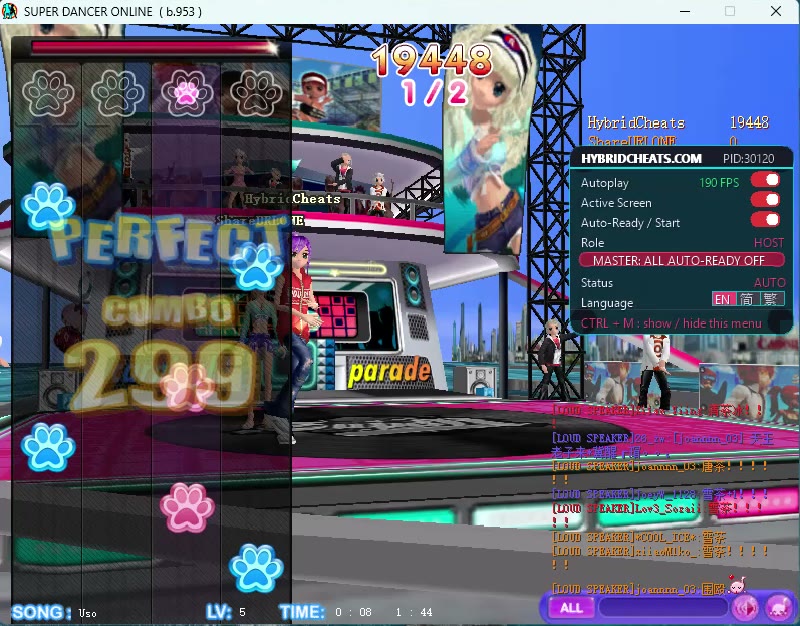
The engine reads the live rhythm chart and lands every input inside the window the game scores as PERFECT. That is the only judgement it produces, on a chart you have never seen exactly as on one you have played a thousand times. There is no note limit, no combo ceiling and no session cap: it holds the chain for as long as you leave it running.

What that adds up to is the whole game, effortless. Every song a full perfect, every round yours, MVP and champion as the ordinary outcome rather than a good night. The 1,488 chain in our tutorial footage is not a maximum — it is simply where that recording stopped.

FULL PERFECT
EVERY ROUND WON
MVP & CHAMPION
Watch the footage →
Super Dancer Online on the CIBMALL client, mid-song with a PERFECT judgement and the combo climbing, the HybridCheats overlay showing Autoplay, Active Screen and Auto-Ready / Start
LIVE CAPTURE · CIBMALL
COMBO CEILING
NO CAP · NO LIMIT
PERFECT NOTES100%
COMBO LIMITNONE
MANUAL INPUTS0
SONGS PER SESSIONUNLIMITED

The 1,488 chain in our footage is where the recording stopped, not where the engine did.

Exclusive
SESSION LOOP
01
PRESS CONFIRM
the only manual step
02
AUTO-READY
handled by hybrid
03
AUTO-START
handled by hybrid
04
SONG PLAYS
autoplay engine
03
EXCLUSIVE
AUTO-READY & AUTO-START

The only SDO add-on with the lobby loop built in. Inject once, put the kettle on, come back to a stack of finished songs.

Autoplay that stops at the notes still ties you to the desk, clicking "ready" between every track. Hybrid takes the room as well: a song ends, the engine readies up, the round starts, the next chart loads, the input begins. The only thing you did by hand was press Confirm.

This is the part that ten years on a single game buys you. Auto-Ready and Auto-Start ship on selected packages.

Which packages include it →
04
CONTROL
EVERY KEY IS YOURS

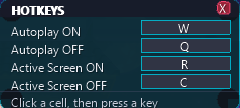
Four actions, and not one of them arrives bound to anything. The grid ships completely blank — no defaults, no reserved keys, nothing of ours sitting on a key your hand already owns. You decide what fires what, and the software adapts to you rather than the other way round.

Autoplay ON and Autoplay OFF are the pair you live on: turn the engine loose, or take a chart back and play it yourself. Active Screen is the anti-freeze — it keeps the client awake and the window active so a long unattended session does not stall on a screensaver or an idle timeout — and it gets its own on and off key rather than being buried in a menu.

Binding is one gesture: click a cell, press the key you want in it, done. That layout is then yours for good — the same on the next launch, the next build and the next subscription — and every key fires with the game focused, so nothing needs alt-tabbing. Total control of the controls is not a checkbox we added late; it is how we think software you run every night should behave.

HOTKEYS
KEY ACTION
YOURS Autoplay ON
YOURS Autoplay OFF
YOURS Active Screen ON — anti-freeze
YOURS Active Screen OFF
Click a cell, then press a key

Every cell starts empty and takes whatever you press. There is no default layout, because we do not think the keys should be ours to pick.

In-game overlay · CTRL + M to show or hide
// In-game overlay

CTRL + M, without leaving the song

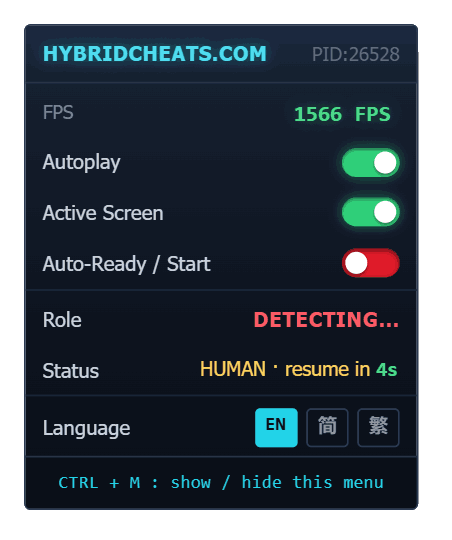
The controls also live in a small overlay drawn over the game itself, so a mid-session change never costs you an alt-tab. CTRL + M shows and hides it.

Autoplay, Active Screen and Auto-Ready / Start each get a switch whose state you can read at a glance, with a live FPS counter beside them — and the overlay speaks English, Simplified and Traditional Chinese, like the rest of the client.

Live FPS Autoplay Active Screen Auto-Ready / Start CTRL + M
// Deliberately small

Your keys are the only thing to set

Timing offsets, per-song profiles, behaviour curves: a wall of sliders only moves the work onto you, and leaves you guessing which combination is the one that actually works. We tuned it once, properly, and shipped the result. Which keys you press is a different matter — that is your muscle memory, not our tuning — and past those four cells the Main tab is a short list of radio buttons and a Confirm button, because that is genuinely all there is to decide.

Less to configure is also less to break on patch day. The loader pulls its own updates, so the launch you do tomorrow is the launch you did today.

05
ACCOUNT
YOUR LICENCE, IN THE CLIENT

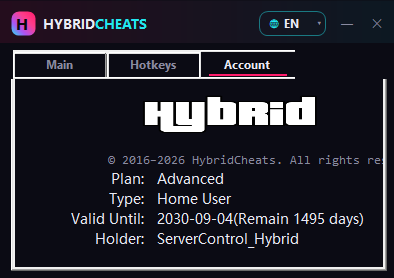
The Account tab spells out exactly what you are running: plan, type, holder, and the number of days you have left.

Plan and Type name the build you loaded. Holder shows the account it is bound to. Valid Until prints the date and the remaining days together, so a renewal never sneaks up on you. The game window title carries the same details, stamped in at build time.

None of that is something you have to take on trust. If you paid for an Advanced licence running to 2030, the client says so on screen, every session.

HybridCheats Account tab showing Plan, Type, Valid Until with remaining days, and Holder
ACCOUNT TAB
The same details, stamped into the game window title
Game window title bar showing the HybridCheats licence stamped into it
9:41 LIVE
HYBRID99
member panel
SUBSCRIPTION
ACTIVE
PLAN
ADVANCED · HOME USER
VALID UNTIL
2030 · 09 · 04
RENEW
// Away from the PC

The member panel, in your pocket

Everything account-shaped lives in the web panel: renewals, receipts, downloads, password resets, and a support ticket desk that takes file attachments. It is fully responsive, so checking a subscription is a phone job rather than a laptop job.

No native app to install. iOS Safari, Android Chrome, Samsung Internet — anywhere modern HTTPS goes.

06
REACH

Three platforms. Pick yours.

Super Dancer Online is not one game but three live operations — different clients, different regions, different languages. We build for all three, the panel changes shape to match the one you play, and every one of them switches on the moment you pay.

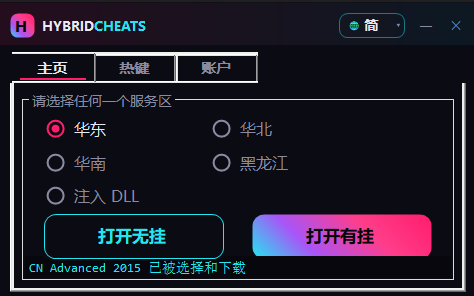
HybridCheats 9you build: Main tab with East / North / South China and Heilongjiang region select, and launch-clean / launch-with-engine buttons
Mainland build · Main / Hotkeys / Account
C
SDO-X · CIBMALL
International platform

The international build, operated by Cib Development Sdn Bhd. One service, launched straight from the Main tab with nothing to pick first — and this is the platform where Auto-Ready and Auto-Start are supported.

BUILD CIBMALL · SDO-X
MAIN TAB Launch SDO · Inject DLL
AUTO-READY SUPPORTED
ACTIVATION INSTANT
Z
SUPER (ZRF)
ZRFSOFT · Mainland China

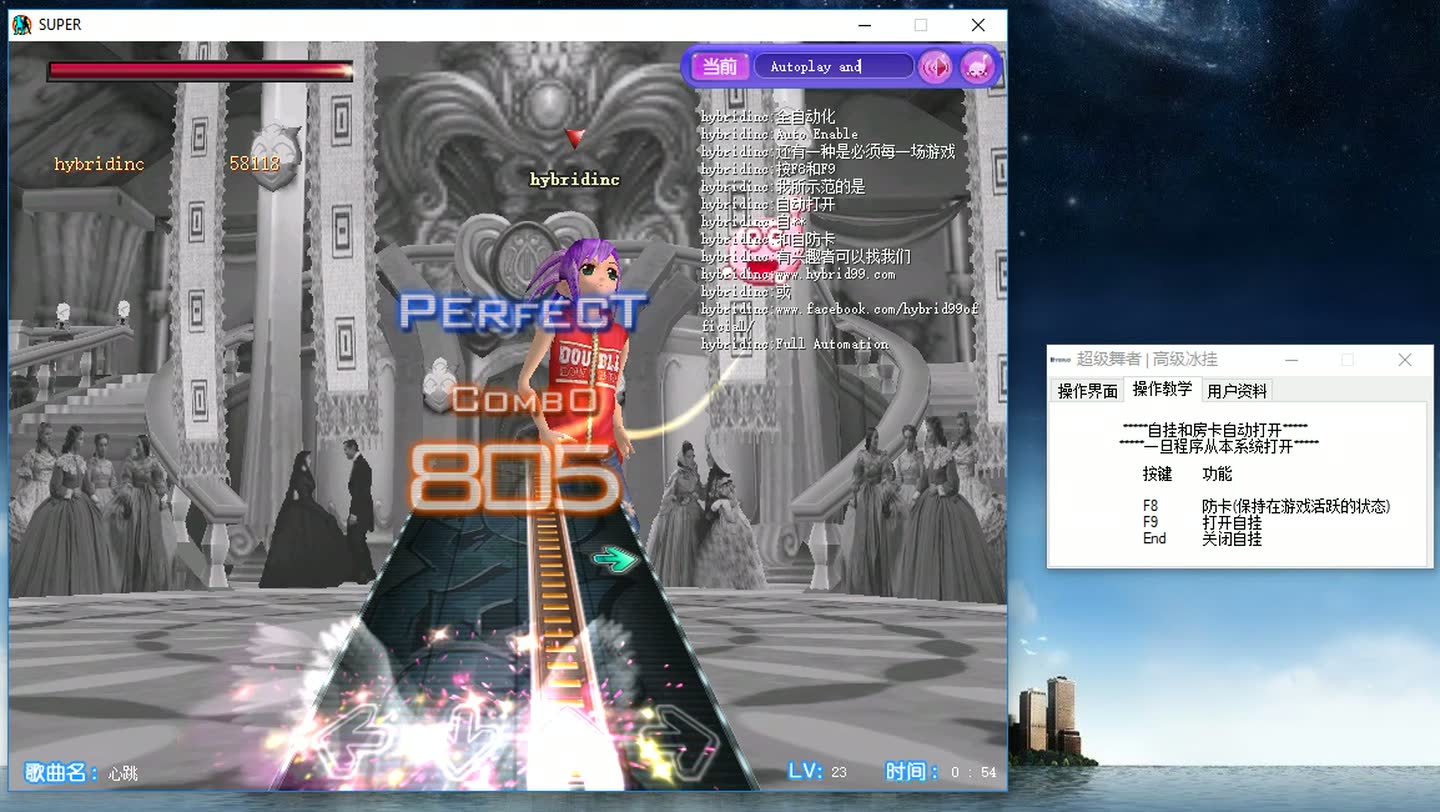
The 超级舞者 revival at sdo.zrfsoft.com, where returning players brought their old 久游 accounts back. Its own build, its own licence, the same Chinese panel — and the same engine that reads the rhythm chart natively.

BUILD ZRF SUPER · Super Dancer
SERVER sdo.zrfsoft.com
PANEL UI Simplified Chinese
ACTIVATION INSTANT
9
SUPER (9YOU)
9you platform · Mainland China

The mainland client, with a panel that is Chinese all the way down — Main, Hotkeys and Account. Pick your region, then choose whether to launch clean or with the engine already loaded.

BUILD 9you SUPER · Super Dancer
REGIONS East · North · South · Heilongjiang
PANEL UI Simplified Chinese
ACTIVATION INSTANT

These are three separate products. A subscription covers one platform: a CIBMALL licence does not work on ZRF or 9you, and neither mainland licence works on the other. If you play more than one, you subscribe to more than one.

// 07 · Before you pay

Or skip all this and watch it.

Every claim on this page is on tape. Seven full-length tutorials — the CIBMALL run, the mainland build, both installers, the autoplay walkthrough and remote setup — public, playable, no account needed.

// Ready when you are

Five durations.
Your platform.

From RM40 a month, or RM385 for two years — published on a page anyone can read. Subscribe for the platform you actually play.

Invite Friends

Refer 5 customer get 1 month free subscription